Your dead letters, handled before the 3 a.m. call.
The management UI tells you a queue holds 300 messages. Warren tells you what they are, why they died, which failure is new, and whether your replay actually worked.
Self-hosted next to your broker. RabbitMQ 3.13 and 4.x, classic and quorum queues.
Early access: every Team and Pro feature free until 31 March 2027 →
Free, no signupOne container, your data stays in your networkListed in the RabbitMQ developer tools
| Failure | Messages | In queues |
|---|---|---|
| expired in orders.wait.5mnew | 3 | orders.dlq 3 |
| PaymentDeclinedExceptionnote | 6 | orders.dlq 4 · +1 |
| OrderNotFoundException | 5 | orders.dlq 2 · +1 |
The same failure in every dead-letter queue is one row. New ones are marked, and can page you.
| Message id | Last death | Original route | Payload | |
|---|---|---|---|---|
| order-4700 | expired ×5 wait.5m | orders → order.created | {"orderId":4700,"customer":"ACME… | |
| order-4701 | expired ×5 wait.5m | orders → order.created | {"orderId":4701,"customer":"ACME… | |
| order-4702 | expired ×5 wait.5m | orders → order.created | {"orderId":4702,"customer":"ACME… |
| When | From → To | Replayed |
|---|---|---|
| just now · nina | orders.dlq → original | 3 1 back |
| Tue · ops-bot | billing.invoice.dead → original | 12 |
| Mon · tomas | orders.dlq → order.retry | 0 failed |
Every replay: who, when, from where to where, per-message outcome, payload preview.
What the management UI, a shovel and a script cannot tell you.
Keep the management UI for configuring the broker. Warren runs the traffic on it, and never touches queues, exchanges or policies. Compared in detail: Warren vs. the management UI and shovel, scripts and other tools.
One failure, every queue. And the new one marked.
The same exception in five dead-letter queues is one row with each queue's count, and one replay sends them all back to their original routes. A failure that was not there before is tagged new, and an alert can page you the moment it appears, not when the usual timeouts pile up a little more.
Failures across queues →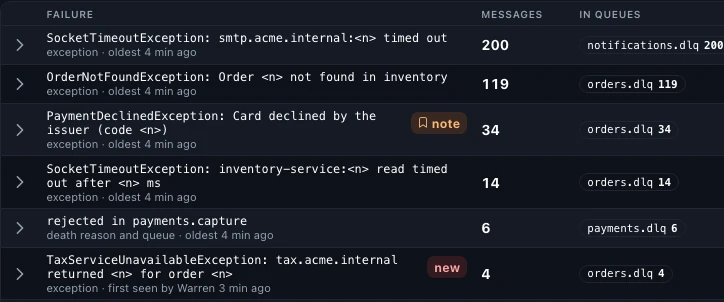
Did the replay work? Warren checks.
A confirmed publish only says the broker took the message. Warren finds replayed messages that die again and counts them against their replay: "1 of 2 died again, back in payments.refund.dlq", marked per message. It looks again after 5 minutes, 30 minutes, 2 hours and a day.
Replay outcome →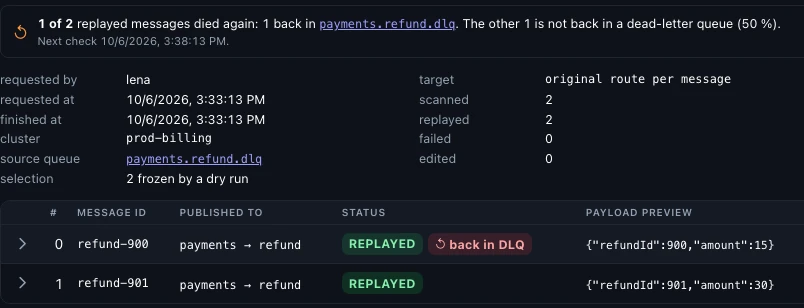
Exactly the messages you saw, and an undo.
"The first 500" or "every match" is checked first: Warren freezes those messages, shows how many, and the confirm takes exactly them. Discarded and purged messages are kept for seven days, so one click on Restore puts them back. In Pro a second operator can approve first.
Dry runs and undo →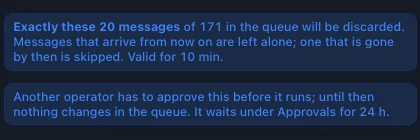
A new failure, replayed, and the one that came back. Twenty seconds.
Recorded in the real app. Pick a recording below; the big one plays it.
The whole story in four minutes: a step-by-step walkthrough on YouTube, from 200 dead letters in the management UI to a throttled replay, with a note for the team, parking, the audit log and replay rules.
Built for the moment a queue turns red.
Browsing and replaying are in the recordings above. These keep a team out of the DLQ in the first place.
Know about the pile-up before the customer does.
Warren samples every queue around the clock. A rule like “orders.dlq above 100 for five minutes” fires once, reaches Slack, Teams, PagerDuty, Opsgenie, e-mail or any webhook with a link to the queue, and sends the all-clear when it recovers; in PagerDuty and Opsgenie that closes the incident. No flood, no silence. A rule on the inflow rate catches a mass failure even while a replay rule keeps draining the queue.
MESSAGES_ABOVE · NO_CONSUMERS · GROWTH · INFLOW_RATE · disk · memory · re-notify after 4 h| Rule | Condition | Channel | State |
|---|---|---|---|
| Orders DLQ growing | messages > 100 for 300 s | #ops-alerts | OK |
| Billing stuck | no consumers, ready > 0 | #billing | OK |
- Replay rulesThe 3 a.m. timeout replays itself on a schedule, with backoff and attempt limits; the broken message waits for you.
- Payloads you can readJSON as a tree or a table; PDFs, images and CSV inside payloads open as files.
- Edit before replayFix a field or drop the retry counter, marked as edited in the audit log.
- Park poison messagesOut of the way of replays and rules, with their death history intact.
- Spring and MassTransitException headers,
_errorand_skippedqueues, replays back to the endpoint. - Set-up checksQueues that drop dead letters, exchanges into nowhere, and a map of where they go.
- Personal data hiddenTokens, IBANs and e-mail addresses masked in the view; replays keep the real data.
- Roles and SSOSupport looks, on-call acts. OIDC sign-in in Pro.
- Audit logSearchable, shareable as a link; CSV and SIEM forwarding in Pro.
- Keyboard all the wayj k x r, ⌘K for any action, f puts a letter on every button.
- PrometheusQueue, broker and alert metrics with ready-made alert rules, in Team and Pro.
- Export, import, publishNDJSON out before a purge, back in later or on staging, or one test message.
No message is ever lost. Here is the exact mechanism.
- Own channel, confirms onNothing is shared with your consumers.
- Fetch, do not acknowledgeUnselected messages stay where they were.
- Publish, confirm, then ackThe source is acknowledged only after the broker confirmed the copy.
- Release the restA crash mid-way releases everything not yet moved.
At-least-once, like RabbitMQ itself: if Warren dies between the confirm and its own ack, that one message arrives twice. On RabbitMQ 3.13, where every peek of a quorum queue counts as a delivery, Warren asks before it reads. The details →
Runs next to your broker. Your payloads never leave your network.
One container with an embedded database, or point Pro at your own PostgreSQL. Configure clusters with environment variables or a YAML file, put it behind your ingress, sign in with SSO. Air-gapped installations work: the licence is checked offline.
- Docker image, versioned releases with a changelog, database migrations run on upgrade
- Reads through the management API, replays over AMQP with a least-privilege user
- Metrics and audit stay in your network, embedded or in your Postgres, retention is yours to set; Pro forwards the audit log to your SIEM
- No telemetry, no phone-home, no third-party scripts
A RabbitMQ, Warren and three dead-letter queues with real dead letters. Only Docker needed.
- 1
docker-compose.try.ymlCopy it and save it as
docker-compose.try.yml. Read it first if you like: a RabbitMQ, a one-off step that fills three queues with dead letters, and Warren.# Try Warren in a minute: a RabbitMQ, Warren next to it, and dead letters to look at. # # docker compose -f docker-compose.try.yml up -d → http://localhost:8080, sign in as admin / admin # docker compose -f docker-compose.try.yml down -v → everything gone again # # The seed step fills a few queues the way real consumers would: orders rejected by the consumer, # invoices that expired while nobody listened, shipping labels a Spring consumer republished with its # exception. Open orders.dlq, look at why they died, select a few and replay them. Nothing here # touches a broker of your own; the RabbitMQ management UI is on http://localhost:15680 (warren / warren), off the # default port so it never collides with a RabbitMQ you already run. # Ports taken? TRY_WARREN_PORT=8081 TRY_RABBIT_UI_PORT=15690 docker compose -f docker-compose.try.yml up -d name: warren-try services: rabbitmq: image: rabbitmq:4-management environment: # guest may only sign in from localhost; Warren and the seed step come from their own containers RABBITMQ_DEFAULT_USER: warren RABBITMQ_DEFAULT_PASS: warren ports: - "${TRY_RABBIT_UI_PORT:-15680}:15672" healthcheck: test: ["CMD", "rabbitmq-diagnostics", "-q", "check_port_connectivity"] interval: 5s retries: 30 # Declares the demo topology and dead-letters messages through the management API, then exits. # Runs once: when orders.dlq already holds messages it leaves them alone. seed: image: curlimages/curl:8.11.1 depends_on: rabbitmq: { condition: service_healthy } restart: "no" entrypoint: ["/bin/sh", "-c"] command: - | set -e api() { curl -sf -u warren:warren -H 'content-type: application/json' -X "$$1" "http://rabbitmq:15672/api$$2" $${3:+-d "$$3"} > /dev/null; } if curl -sf -u warren:warren http://rabbitmq:15672/api/queues/%2F/orders.dlq | grep -q '"messages":[1-9]'; then echo "already seeded"; exit 0; fi # orders: the consumer rejects, the broker dead-letters to orders.dlq api PUT /exchanges/%2F/orders '{"type":"topic","durable":true}' api PUT /exchanges/%2F/orders.dlx '{"type":"fanout","durable":true}' api PUT /queues/%2F/orders.dlq '{"durable":true}' api PUT /queues/%2F/orders.process '{"durable":true,"arguments":{"x-dead-letter-exchange":"orders.dlx"}}' api POST /bindings/%2F/e/orders.dlx/q/orders.dlq '{"routing_key":""}' api POST /bindings/%2F/e/orders/q/orders.process '{"routing_key":"order.*"}' # billing: invoices with a TTL, nobody consumes, they expire into billing.invoice.dead api PUT /exchanges/%2F/billing '{"type":"direct","durable":true}' api PUT /exchanges/%2F/billing.dlx '{"type":"fanout","durable":true}' api PUT /queues/%2F/billing.invoice.dead '{"durable":true}' api PUT /queues/%2F/billing.invoice '{"durable":true,"arguments":{"x-message-ttl":2000,"x-dead-letter-exchange":"billing.dlx"}}' api POST /bindings/%2F/e/billing.dlx/q/billing.invoice.dead '{"routing_key":""}' api POST /bindings/%2F/e/billing/q/billing.invoice '{"routing_key":"invoice"}' # shipping: a Spring consumer gave up and republished to the DLQ itself (RepublishMessageRecoverer) api PUT /exchanges/%2F/shipping '{"type":"direct","durable":true}' api PUT /queues/%2F/shipping.label '{"durable":true}' api PUT /queues/%2F/shipping.label.dlq '{"durable":true}' api POST /bindings/%2F/e/shipping/q/shipping.label '{"routing_key":"label"}' customers="ACME Northwind Contoso Initech Globex" i=0 for c in $$customers $$customers $$customers $$customers; do i=$$((i + 1)); id=$$((4700 + i)) if [ $$((i % 4)) -eq 0 ]; then err='Customer '$$c' is locked'; type=com.acme.orders.CustomerLockedException else err='Timeout calling inventory after 5000 ms'; type=java.net.SocketTimeoutException; fi api POST /exchanges/%2F/orders/publish "{\"routing_key\":\"order.created\",\"payload_encoding\":\"string\",\"payload\":\"{\\\"orderId\\\":$$id,\\\"customer\\\":\\\"$$c\\\",\\\"total\\\":$$((i * 37)).50}\",\"properties\":{\"message_id\":\"order-$$id\",\"content_type\":\"application/json\",\"headers\":{\"x-exception-type\":\"$$type\",\"x-exception-message\":\"$$err\"}}}" done api POST /queues/%2F/orders.process/get '{"count":20,"ackmode":"reject_requeue_false","encoding":"auto"}' # three orders still on their way, so orders.process is not empty for id in 4801 4802 4803; do api POST /exchanges/%2F/orders/publish "{\"routing_key\":\"order.updated\",\"payload_encoding\":\"string\",\"payload\":\"{\\\"orderId\\\":$$id}\",\"properties\":{\"message_id\":\"order-$$id\",\"content_type\":\"application/json\"}}" done for n in 1 2 3 4 5 6; do api POST /exchanges/%2F/billing/publish "{\"routing_key\":\"invoice\",\"payload_encoding\":\"string\",\"payload\":\"{\\\"invoiceNo\\\":\\\"2026-10$$n\\\",\\\"amount\\\":$$((n * 120))}\",\"properties\":{\"message_id\":\"inv-2026-10$$n\",\"content_type\":\"application/json\"}}" done for n in 1 2 3 4; do api POST /exchanges/%2F/amq.default/publish "{\"routing_key\":\"shipping.label.dlq\",\"payload_encoding\":\"string\",\"payload\":\"{\\\"shipmentId\\\":\\\"SH-90$$n\\\",\\\"carrier\\\":\\\"DHL\\\"}\",\"properties\":{\"message_id\":\"label-90$$n\",\"content_type\":\"application/json\",\"headers\":{\"x-original-exchange\":\"shipping\",\"x-original-routing-key\":\"label\",\"x-exception-message\":\"Carrier API answered 503 Service Unavailable\",\"x-retry-count\":3}}}" done echo "seeded: 20 in orders.dlq, 6 expiring into billing.invoice.dead, 4 in shipping.label.dlq" warren: image: ghcr.io/viba88/warren:0.17 depends_on: rabbitmq: { condition: service_healthy } ports: - "${TRY_WARREN_PORT:-8080}:8080" environment: WARREN_RABBIT_ID: try WARREN_RABBIT_NAME: Try-out broker WARREN_RABBIT_MANAGEMENT_URL: http://rabbitmq:15672 WARREN_RABBIT_HOST: rabbitmq WARREN_RABBIT_USERNAME: warren WARREN_RABBIT_PASSWORD: warren WARREN_ADMIN_USERNAME: admin WARREN_ADMIN_PASSWORD: admin volumes: - warren-data:/app/data volumes: warren-data:
- 2
docker compose -f docker-compose.try.yml up -d - 3Open localhost:8080, sign in as admin / admin, open orders.dlq.
Done? docker compose -f docker-compose.try.yml down -v removes it all.
No Docker at hand? See what you would get: the recordings above, or the four-minute walkthrough on YouTube.
services:
  warren:
    image: ghcr.io/viba88/warren:0.17
    ports: ["8080:8080"]
    volumes: [warren-data:/app/data]
    environment:
      WARREN_RABBIT_MANAGEMENT_URL: http://rabbitmq:15672
      WARREN_RABBIT_HOST: rabbitmq
      WARREN_RABBIT_USERNAME: warren
      WARREN_RABBIT_PASSWORD: ${RABBIT_PASSWORD}
      WARREN_ADMIN_PASSWORD: ${WARREN_ADMIN_PASSWORD}
      # Team/Pro: WARREN_LICENSE_KEY
      # Pro: WARREN_DB_URL, WARREN_OIDC_ISSUER_URI
volumes:
  warren-data:
docker compose up -d, then sign in on port 8080 as admin with the password you set. The RabbitMQ user needs the management tag and read/write on the vhost; add monitoring to see disk and memory of the nodes. Full examples, also with PostgreSQL, are in the documentation.
Every Team and Pro feature, free until 31 March 2027.
Single sign-on, roles, four-eyes approval, audit export to your SIEM, alerts, replay rules, 90 days of history and your own PostgreSQL. Ask for a key and it comes by e-mail. Afterwards Warren falls back to Community, nothing is deleted, and early-access users get 50% off their first licence.
Free tools for RabbitMQ operators.
For the upgrade, the message that never arrived, the queue that has to become a quorum queue. They run in your browser; nothing you paste is sent anywhere.
Questions operators ask first.
Is Warren a replacement for the management UI?
No, and it is not trying to be. The management UI configures the broker and will keep doing that. Warren is for the people who run the traffic on it: reading messages, finding out why they died, alerting, replaying, and proving afterwards what was done. Most teams have both open. What each one is for, side by side.
Does Warren change my broker configuration?
No, by design: a tool that can replay production messages should not also be able to reshape the broker. It reads queues, bindings and messages through the management API and publishes over AMQP; no policies, no exchanges, no bindings. It never deletes queues, exchanges or bindings; the only queue it creates is a parking queue, when an operator parks messages. The only destructive actions are discarding messages and purging a queue: operators only, with a reason, recorded in the audit log.
What permissions does the RabbitMQ user need?
The management tag plus read and write on the vhosts you configure, and the monitoring tag if Warren should show disk and memory of the nodes. Configure permission is only needed if Warren should create parking queues itself; without it, create <queue>.parking once and Warren uses it as it is.
Does peeking at messages have side effects?
RabbitMQ marks peeked messages as redelivered. That is a property of the broker and is visible to consumers as a flag; the messages stay in place and in order. On RabbitMQ 3.13 a peek of a quorum queue with a delivery limit also counts as a delivery; Warren asks before it reads such a queue.
Will support see customers' personal data?
Not by default. The message view hides values whose field name looks sensitive (password, token, IBAN, e-mail and more, configurable with WARREN_MASKING_FIELDS) and anything that looks like an e-mail address, an IBAN or a card number. Operators and admins can show one message's values, viewers cannot; in Community, where every user is an admin, anyone signed in can. This is display masking: replays, downloads and exports keep the real data, and so does the API for anyone with access.
Which RabbitMQ versions are supported?
3.13 and 4.x, classic and quorum queues. Streams are read-only for now.
Team or Pro?
Team is for a team that runs its own brokers: up to three, with any number of vhosts each, roles so support can look while on-call acts, history, alerts, and rules that retry dead letters by themselves. Pro is for a company that has to show what happened: any number of brokers, four-eyes approval for replays, discards and purges, the audit log as CSV and in your SIEM, 90 days of history, sign-in through your identity provider, and your own PostgreSQL. A Team licence upgrades to Pro in place; nothing is reinstalled. A licence covers one installation: one running Warren, however many brokers and vhosts it watches, so prod, staging and dev on one Warren count once.
What does Team or Pro cost?
Nothing until 31 March 2027: Warren is in early access, and every Team and Pro feature is free with a key you can request here. After that date Warren falls back to Community until a new key is installed; nothing is deleted, and early-access users get 50% off their first licence. Community stays free.
Is Warren open source?
Not at the moment. Warren is distributed as a ready-to-run container image; the Community edition is free to use for any purpose, without registration or time limit. The source may open up later; if that matters to you, tell us. The compose file is part of the documentation; bugs and wishes go through the feedback form.
Where is my data?
In your network. Warren stores replay audit entries, queue metrics and users in its embedded database on a volume you own, or in your own PostgreSQL with Pro. The audit log keeps the first 16 KiB of each moved message by default; WARREN_AUDIT_PAYLOAD_BYTES sets how much.
Your first replay is three commands away.
Download the compose file, start it, open localhost:8080. A RabbitMQ with real dead letters is included, so there is nothing to prepare. Free, no account.